What Is the ITISeasy Page Break Feature?
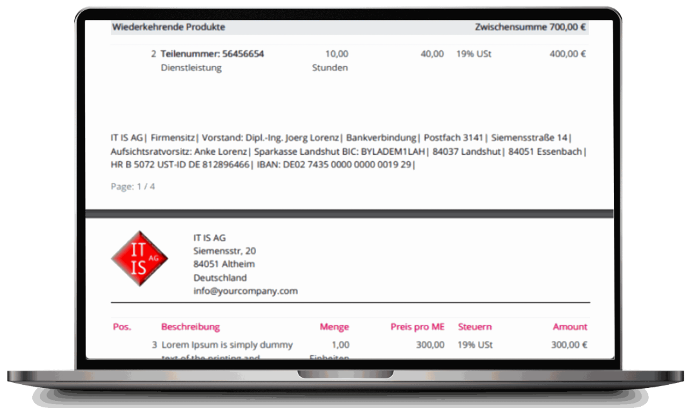
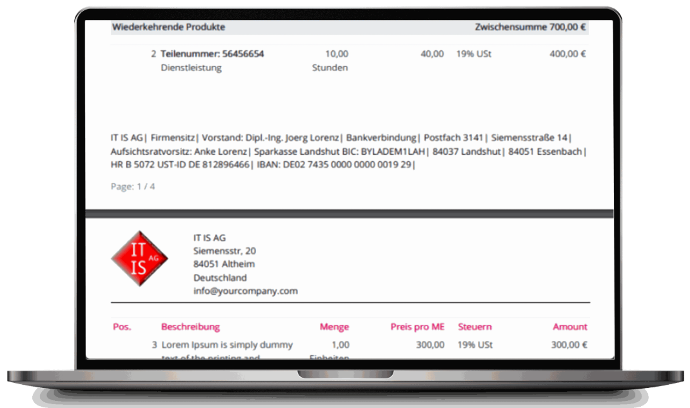
ITISeasy Page Break gives you the ability to manually define where a new page should start within your printed reports. Whether it’s for
aesthetic formatting or logical grouping of information, you decide how your quotes or invoices should appear.
This feature is available directly within your ITISeasy.business product lines and works seamlessly with your existing templates and layouts.
`
What Is the ITISeasy Page Break Feature?
ITISeasy Page Break gives you the ability to manually define where a new page should start within your printed reports. Whether it’s for
aesthetic formatting or logical grouping of information, you decide how your quotes or invoices should appear.
This feature is available directly within your ITISeasy.business product lines and works seamlessly with your existing templates and layouts.
Why Use Manual Page Breaks?
While most ERP systems generate long documents with automatic page breaks,
that can sometimes lead to awkward formatting like:
Cutting a product section in half
Separating subtotals from the actual products
Misaligned document headers or terms & conditions
Why Use Manual Page Breaks?
While most ERP systems generate long documents with automatic page breaks,
that can sometimes lead to awkward formatting like:
Cutting a product section in half
Separating subtotals from the actual products
Misaligned document headers or terms & conditions
With manual pagination, you ensure:
Professional layout in every report
Clear separation of recurring vs. one-time services
Subtotals and sections remain visually grouped
Perfect output for PDF and printing
With manual pagination, you ensure:
Professional layout in every report
Clear separation of recurring vs. one-time services
Subtotals and sections remain visually grouped
Perfect output for PDF and printing
Key Benefits at a Glance
Key Benefits at a Glance

Manual Control Over
Page Layout
Place page breaks exactly where it makes sense for your client-facing documents.

Easy-to-Use UI
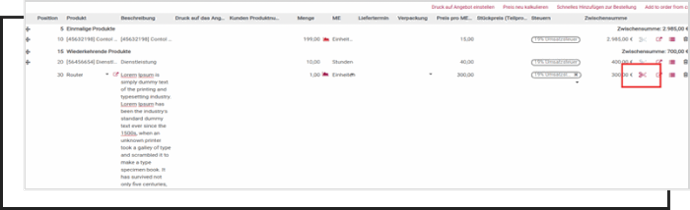
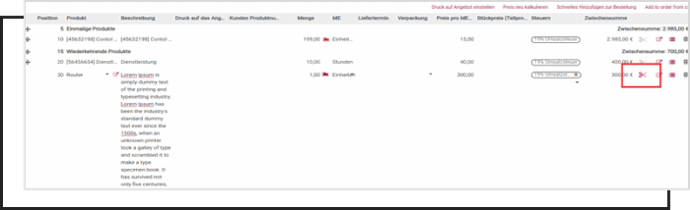
Click the ✂️ (scissors icon) directly in the product line to insert a break — no need for coding or templates.

Better Client Experience
Third Feature
Improve readability, especially for multi-page sales orders and detailed invoices.

Manual Control Over
Page Layout
Place page breaks exactly where it makes sense for your client-facing documents.

Easy-to-Use UI
Click the ✂️ (scissors icon) directly in the product line to insert a break — no need for coding or templates.

Better Client Experience
Third Feature
Improve readability, especially for multi-page sales orders and detailed invoices.

Works Across
All Reports
Use it in quotations, invoices, purchase
orders, and delivery slips.
Compatible with
Print & PDF
Your custom page breaks are preserved in both print view and PDF exports.

Works Across
All Reports
Use it in quotations, invoices, purchase
orders, and delivery slips.
Compatible with
Print & PDF
Your custom page breaks are preserved in both print view and PDF exports.
How It Works – Just Click and Break
Using manual page breaks in ITISeasy.business is simple:
Create or open a sales order, invoice, or quote
Hover over the product line where you want to insert a page break
Click the
scissors icon
on the right side of the line
Done! Your break will now force the next item to begin on a new page
Want to create a cleaner layout for your printed contracts or proposals? This feature is for you.
How It Works – Just Click and Break
Using manual page breaks in ITISeasy.business is simple:
Create or open a sales order, invoice, or quote
Hover over the product line where you want to insert a page break
Click the
scissors icon
on the right side of the line
Done! Your break will now force the next item to begin on a new page
Want to create a cleaner layout for your printed contracts or proposals? This feature is for you.

When Should You Use Manual Page Breaks?
Here are some common use cases:
Separate hardware from services
Group products by project phase
Isolate terms & conditions to the final page
Ensure customer-specific discounts show on their own page
Improve layout for multi-currency or tax summary sections

When Should You Use Manual Page Breaks?
Here are some common use cases:
Separate hardware from services
Group products by project phase
Isolate terms & conditions to the final page
Ensure customer-specific discounts show on their own page
Improve layout for multi-currency or tax summary sections
Professional Documents – Without the Design Hassle
Manual pagination brings clarity and structure to your business communication
— no more awkward PDF breaks or scrambled layouts.
Combined with other features like Subtotals & Sections, Contract Attachments, and
Text Blocks, your ERP reports become visually professional and logically sound.
Professional Documents – Without the Design Hassle
Manual pagination brings clarity and structure to your business communication
— no more awkward PDF breaks or scrambled layouts.
Combined with other features like Subtotals & Sections, Contract Attachments, and
Text Blocks, your ERP reports become visually professional and logically sound.
Ready to Take Control of Your Page Layout?
Whether you’re building a one-page quote or a 10-page project proposal
— the Page Break feature helps you present like a pro.
Included in your ITISeasy.business subscription
No additional setup or coding needed
Works with all standard and custom templates
Talk to an Expert
Ready to Take Control of Your Page Layout?
Whether you’re building a one-page quote or a 10-page project proposal
— the Page Break feature helps you present like a pro.
Included in your ITISeasy.business subscription
No additional setup or coding needed
Works with all standard and custom templates
Talk to an Expert
Smart Layout. Clear Documents. Happier Clients.
With ITISeasy Page Breaks, every page tells a story — exactly how you want it.
Smart Layout. Clear Documents. Happier Clients.
With ITISeasy Page Breaks, every page tells a story — exactly how you want it.